













- Joined
- Jun 28, 2020
- Messages
- 6,948
- Reaction score
- 766
- Points
- 212
- Awards
- 2


So today I came past a neat little trick I used to use in Computer Stores when I wanted the WiFi password to the companies connection. Computer companies always disable the Network & Sharing center so that you can't look into the properties of a connection and get the password from the properties. But I have a solution to that. Let's get onto it.
So, first start CMD. Most of the time CMD is built-in on the computer. If it isn't, open the spoiler.
Opened up CMD? Good. Now let's go and try to get the password.
Step 1: Check what connection the computer is connected to and keep it in mind or write it down. You'll need it. Mines is Dlink-6B75.
Step 2: Now type Netsh wlan show profiles in your CMD window to show a list of connections the computer has ever connected to.
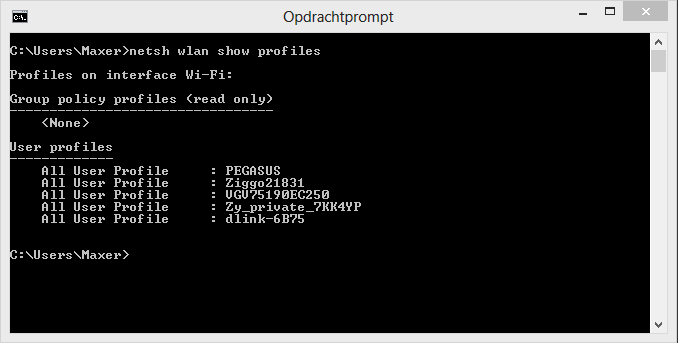
Step 3: Obviously the connection of the computer is in that list. As you see in the spoiler, Dlink-6B75 is in the list. Hmhm? Kk. Next step.
Step 4: Now type the command Netsh Wlan show profiles [network name] key=clear. It will show all the information about the network + the network key.
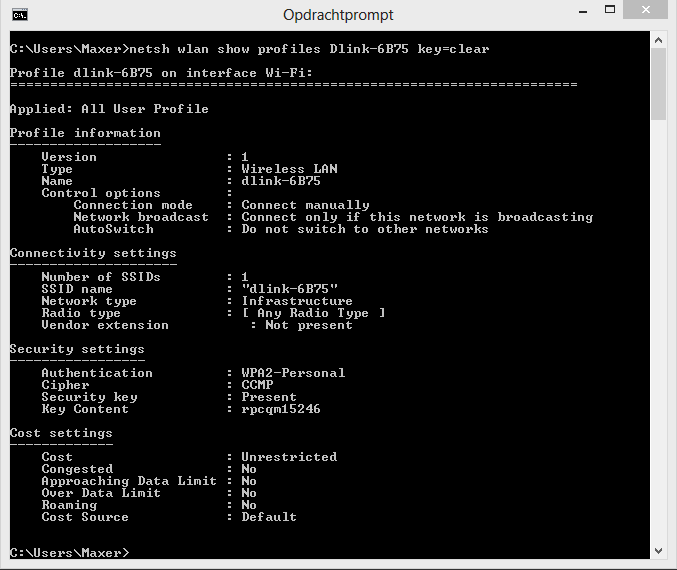
As you see in the spoiler there's a whole list of information about the network Dlink-6B75. In the section Security Settings there is a line called Key Content. Behind Key Content is the key to WiFi connection, which in my case is rpcqm15246.
That was my short tutorial. Hope you've learnt something from it and may there be free WiFi everywhere!
So, first start CMD. Most of the time CMD is built-in on the computer. If it isn't, open the spoiler.
Opened up CMD? Good. Now let's go and try to get the password.
Step 1: Check what connection the computer is connected to and keep it in mind or write it down. You'll need it. Mines is Dlink-6B75.
Step 2: Now type Netsh wlan show profiles in your CMD window to show a list of connections the computer has ever connected to.
Step 3: Obviously the connection of the computer is in that list. As you see in the spoiler, Dlink-6B75 is in the list. Hmhm? Kk. Next step.
Step 4: Now type the command Netsh Wlan show profiles [network name] key=clear. It will show all the information about the network + the network key.
As you see in the spoiler there's a whole list of information about the network Dlink-6B75. In the section Security Settings there is a line called Key Content. Behind Key Content is the key to WiFi connection, which in my case is rpcqm15246.
That was my short tutorial. Hope you've learnt something from it and may there be free WiFi everywhere!