















adrik123adi
Well-known member
- Joined
- Nov 26, 2025
- Messages
- 30
- Reaction score
- 1
- Points
- 102
- Awards
- 2



CraxsRat V8.0
What is CraxsRat V8.0?
CraxsRat V8.0 is the latest iteration of a sophisticated Android Remote Access Trojan developed primarily for remote device management and monitoring. Released in late 2025/early 2026, version 8.0 introduces improved stability, enhanced stealth features, and a refined user interface compared to previous versions.
The tool is known for its modular design, allowing operators to build custom APK payloads, manage multiple infected devices, and extract sensitive data remotely.
Key Features of CraxsRat V8.0
CraxsRat V8.0 offers an extensive set of features that make it a preferred choice in its category:
Full remote control of Android devices
Real-time screen viewing and control
Access to camera and microphone
Keylogging and clipboard monitoring
SMS, calls, and contacts extraction
File manager with upload/download capabilities
Application management (install/uninstall)
Location tracking
Persistence mechanisms
Encrypted communication channels
Detailed Interface Breakdown of CraxsRat V8.0
Main Dashboard
The dashboard serves as the central hub with a dark green theme and red accents for high visibility.
Key Elements:
Top navigation: Dashboard, Clients, Notifications, Servers, Connections, Blocked List
Left sidebar: Builder, Injection, Studio, Dropper, Settings
Info panel showing:
Online clients: 0
Key: TxTxT
Port status
Bottom status bar:
Ready/Selected/Received/Sent bytes
CPU usage percentage
Settings Panel
The Settings section provides extensive customization options.
General Settings:
Check Update on Start (On/Off)
Hide Connections Window (On/Off)
Log All Connections (On/Off)
Language selection (EN-English default)
Alerts Configuration:
Client Disconnect notification (On/Off)
New Client Connected notification (On/Off)
Play Sound for events (On/Off)
Sound selection dropdown

File Manager Options:
Small FileManager Icons (On/Off)
Buttons:
Exit
Reset
SaveSettings
Managers Menu
The comprehensive dropdown menu provides access to all monitoring and control functions:
Primary Categories:
Files – Complete file system access
SMS – Read and manage messages
Calls – View call logs and recordings
Contacts – Export contact list
Accounts – Access saved accounts
Applications – Install/uninstall apps
Permissions – Manage app permissions remotely
Advanced Features:
Monitors – Various monitoring tools
Admin – Administrative controls
Tools – Additional utilities
Extra – Miscellaneous functions
Connection – Manage active connections
Keyboard (beta) – Keylogging features
Client Folder – Organized client data storage
Craxs usdt – Specific module (possibly crypto-related)
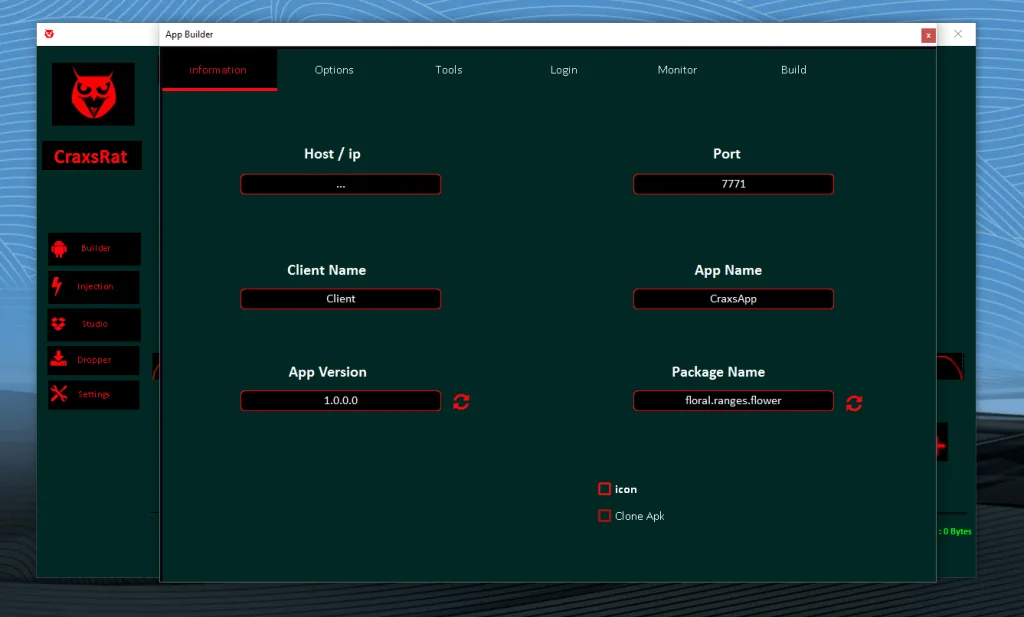
App Builder Interface
The Builder is one of the most powerful components for creating custom payloads.
Information Tab Fields:
Host / IP – Server address
Port – Default 7771
Client Name – Internal identifier (e.g., "Client")
App Name – Display name (e.g., "CraxsApp")
App Version – Version number (e.g., 1.0.0.0)
Package Name – Unique identifier (e.g., floral.ranges.flower)
Options:
Icon selection/upload
Clone APK functionality
Tabs:
Information (active)
Options
Tools
Login
Monitor
Build
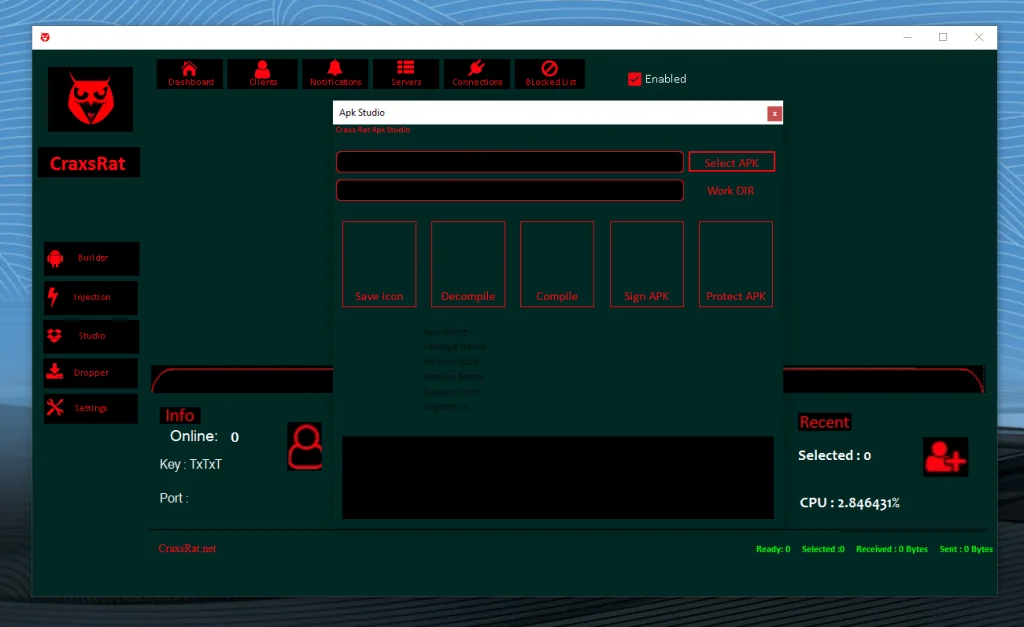
APK Studio
The Studio module specializes in APK modification and analysis.
Main Functions:
Select APK – Choose target application
Work DIR – Set working directory
Save Icon – Preserve custom icons
Decompile – Reverse engineer APK
Compile – Rebuild modified APK
Sign APK – Apply digital signature
Protect APK – Add anti-analysis protections
Display Fields:
App Name
Package Name
Version Code
Version Name
Support From/To – Compatibility settings
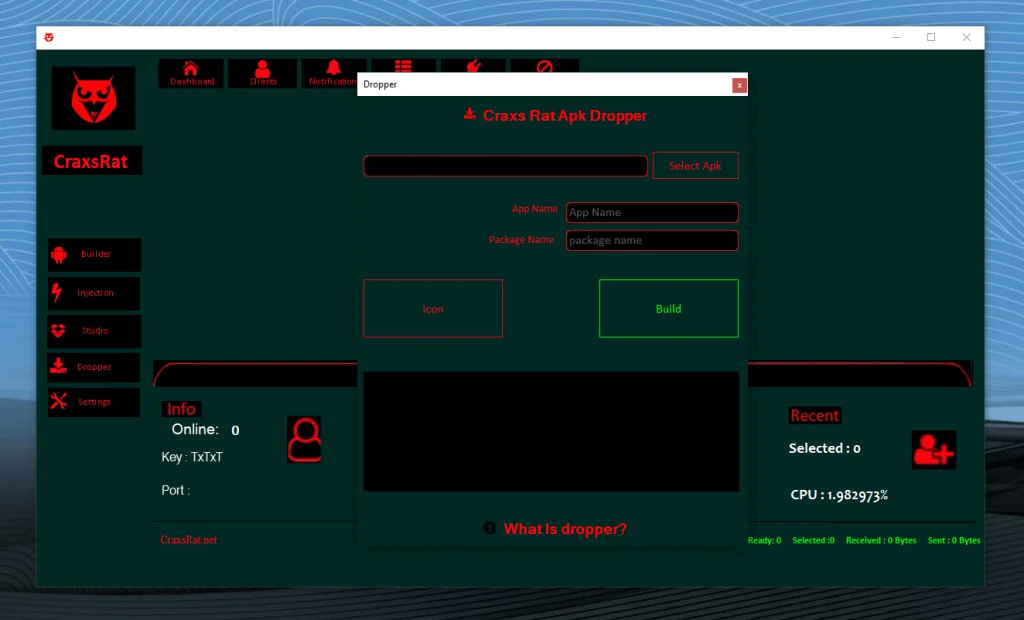
APK Dropper
The Dropper module simplifies payload distribution.
Configuration Options:
Select Apk – Choose base APK
App Name – Custom display name
Package Name – Unique package identifier
Icon selection
Build button for final compilation
Additional Features:
"What is dropper?" help tooltip
https://www.virustotal.com/gui/file/5fdb9035d0f11dbf7c7dbc9ac7d01e461e611ca14d80f18bd78cc387eadd9c75

CraxsRat v8.0
MediaFire is a simple to use free service that lets you put all your photos, documents, music, and video in a single place so you can access them anywhere and share them everywhere.
www.mediafire.com