















- Joined
- Jun 13, 2020
- Messages
- 8,134
- Reaction score
- 1,145
- Points
- 212
- Awards
- 2


If you want to run any programs when you log in to your computer, you can. In this article i will guide you to do that. Any application can be made to auto-start on windows login by adding that specific application to startup folder
There are two ways to add the Programs to windows Start up:
Another Method :Editing Registry
http://1.bp.blogspot.com/_u7otytX-Cwg/TQxSdjusqhI/AAAAAAAAAR0/OrlpbE3VdO4/s1600/windows+start+up+registry+edit.JPG
There are two ways to add the Programs to windows Start up:
- Add the program to Start up folder
- Registry Edit
- Go to Start ->All Programs . You can see “Start up” folder. Double clicking the Start up will open the folder.
- Right click inside folder and selecte New
- Then select “Create Shortcut “option
- Enter the path of the Exe file of the program. for Eg: if you want to run the taskBar at the windows starting. give Path as “C:windowssystem32taskmgr.exe”.
- Hit next and click the finish button.
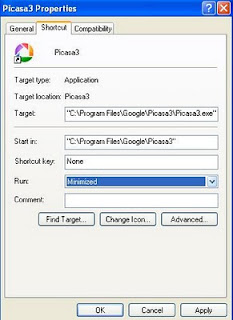
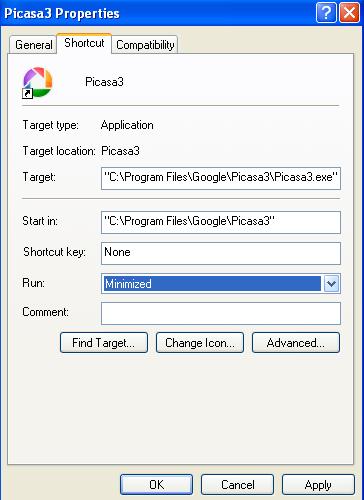
- Right click on the Shortcut and Select Properties
- In shorcut tab ,select Minimized window from Normal window
- Restart the windows, the program will start whenever you start the windows
Another Method :Editing Registry
http://1.bp.blogspot.com/_u7otytX-Cwg/TQxSdjusqhI/AAAAAAAAAR0/OrlpbE3VdO4/s1600/windows+start+up+registry+edit.JPG
- Go to Start->run and type as “regedit”
- Navigate to “HKEY_LOCAL_MACHINESOFTWAREMICROSOFTWINDOWSCURRENT VERSIONRUN”
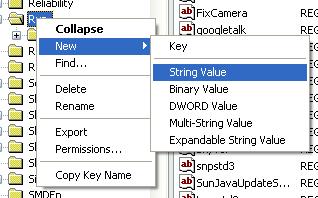
- Right click on the Run folder
- Select New ,then select “String value”
- Now click the the new value and change the name

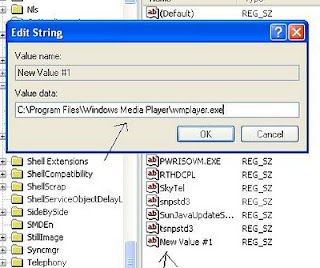
- then Double click and change the value to your program path like “C:Applicationchrome.exe”
- nave exit registry edit
- Restart the windows