
















- Joined
- Jun 13, 2020
- Messages
- 8,099
- Reaction score
- 1,104
- Points
- 212
- Awards
- 2


In this tutorial we are going to use Nmap in Kali Linux to scan for open ports scan and we will be using OS detection. Nmap stands for Network Mapper and is an open source tool for network exploration and security auditing which comes standard with Kali Linux but is also available for Windows, OSX and many other UNIX platforms. Nmap also has a graphical user interface called Zenmap.
First I want to start off with a little warning: Please be careful using the more aggressive functions of Nmap against hosts you do not own or do not have permission to scan. It may be against your ISP’s terms to use some Nmap features.
Open Port Scanning and OS Detection
Let’s start with a ping scan on an IP range to determine live hosts using the following command:
nmap -sP 192.168.0.0-100
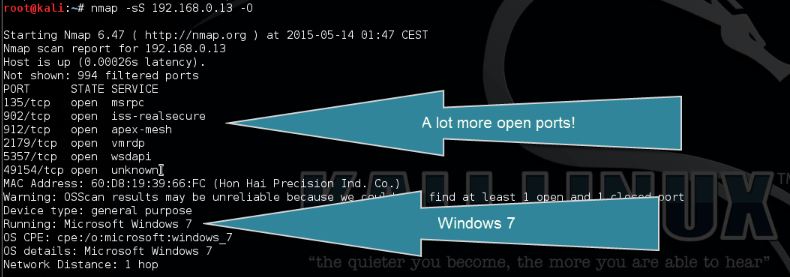
Next we will start a SYN scan with OS detection on one of the live hosts using the following command:
nmap -sS [ip address]-O
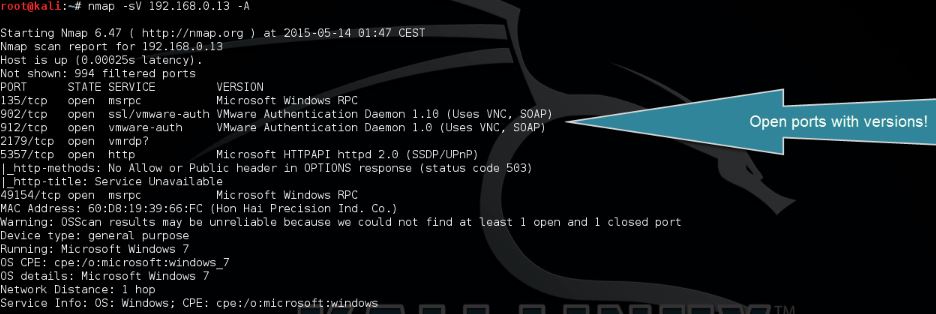
Now we will start an open port scan with version detection using the following command:
nmap -sV 192.168.0.1 -A
When we add -v to the command we can increase the verbosity :
nmap -sV 192.168.0.13 -A -v
First I want to start off with a little warning: Please be careful using the more aggressive functions of Nmap against hosts you do not own or do not have permission to scan. It may be against your ISP’s terms to use some Nmap features.
Open Port Scanning and OS Detection
Let’s start with a ping scan on an IP range to determine live hosts using the following command:
nmap -sP 192.168.0.0-100
Next we will start a SYN scan with OS detection on one of the live hosts using the following command:
nmap -sS [ip address]-O
Now we will start an open port scan with version detection using the following command:
nmap -sV 192.168.0.1 -A
When we add -v to the command we can increase the verbosity :
nmap -sV 192.168.0.13 -A -v