















- Joined
- Jun 13, 2020
- Messages
- 8,134
- Reaction score
- 1,141
- Points
- 212
- Awards
- 2


First we will be piping the output from a simple netcat port scan to a file named output.txt. In general command line output can be outputted to a file by using the > operator followed by a file name. For Netcat this won’t work because we need to direct both stderr and stdout into the file. We can do this by using the following command:
nc -vv -z localhost 1-100 > output.txt 2>&1
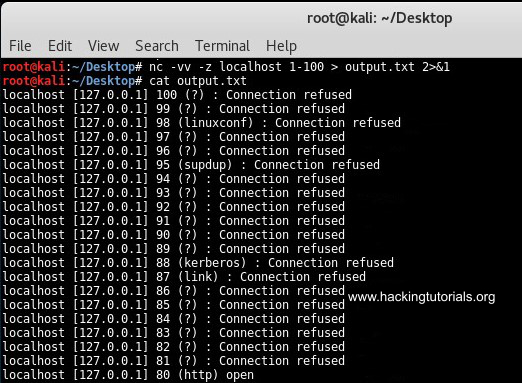
Output Netcat port scan to file.
This command outputted all result from the port scan to the output.txt file. We can use the following command to filter the output for open ports using grep:
nc -vv -z localhost 1-100 2>&1 | grep open > output.txt

Grep netcat output to file.
This command only outputs the open ports to the text file. Let’s see how we can pipe netcat input and output to pivot network connections.
nc -vv -z localhost 1-100 > output.txt 2>&1
Output Netcat port scan to file.
This command outputted all result from the port scan to the output.txt file. We can use the following command to filter the output for open ports using grep:
nc -vv -z localhost 1-100 2>&1 | grep open > output.txt
Grep netcat output to file.
This command only outputs the open ports to the text file. Let’s see how we can pipe netcat input and output to pivot network connections.