















- Joined
- Jun 13, 2020
- Messages
- 8,134
- Reaction score
- 1,141
- Points
- 212
- Awards
- 2


You can change the icon of exe files or any other program files using Icon Changer.
Steps:
1. Download the Icon Changer Trial Version from here:
2. Right Click on the .EXE file and Click Change Icon option. It will open the Icon changer application
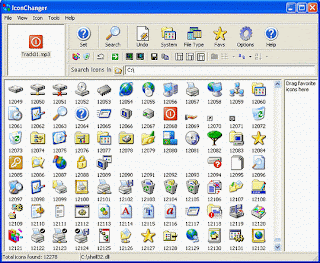
3. Click on Search Button. Icon changer will now search for all the ICONS on your system
3. Now select the ICON of your choice and click on set
4.Now a pop-up window will appear and ask you to select from either of two options. From these select Change embeded icon.
You have successfully Changeed the ICON of your exe file.
Screenshot:
Steps:
1. Download the Icon Changer Trial Version from here:
Using Trial Version , you can change the icon for only 3 times.
2. Right Click on the .EXE file and Click Change Icon option. It will open the Icon changer application
3. Click on Search Button. Icon changer will now search for all the ICONS on your system
3. Now select the ICON of your choice and click on set
4.Now a pop-up window will appear and ask you to select from either of two options. From these select Change embeded icon.
You have successfully Changeed the ICON of your exe file.
Screenshot:
