













- Joined
- Jun 13, 2020
- Messages
- 8,171
- Reaction score
- 1,192
- Points
- 212
- Awards
- 2


Let me explain today how to use the wamp server to run the PHP files. First of all download the Latest wamp server from here:
Step 2:
Run wamp server by this selction
start->All programs->Wamp server->Start wamp server
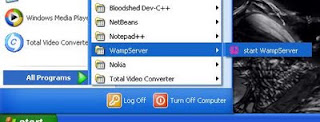
Now you can see the w icon in system tray.

Step 3: Create PHP file
Let us create our php file first.
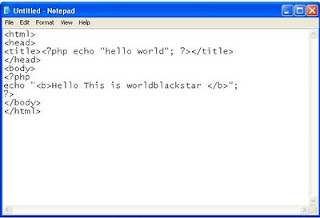
Open notepad and type the php code.
save the file inside this folder
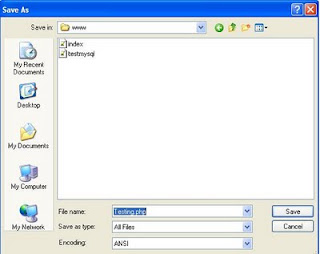
Note: while saving the file, end the name with .php and don’t forget to select all files.
Let us assume i have stored Testing.php
Step 4: Start the server
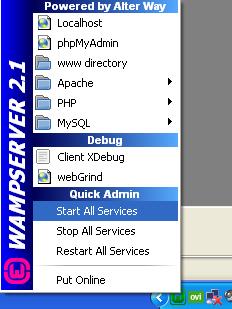
Left click on the wamp icon in system tray.
It will display list of options.
Select “start all services”.
Step 5:Run
Now all services(especially php) is running.
Open the mozilla and type localhost in address bar.
Hit enter
It will show the default page of wamp server.
Now include this Testing.php (my php file name) at the end of the url
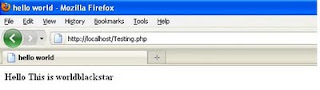
For ex:
It will run your php file.
and install the server.
WampServer
WampServer est une plate-forme de développement Web sous Windows pour des applications Web dynamiques à l’aide du serveur Apache2, du langage de scripts PHP et d’une base de données MySQL.www.wampserver.com
Step 2:
Run wamp server by this selction
start->All programs->Wamp server->Start wamp server

Now you can see the w icon in system tray.
Step 3: Create PHP file
Let us create our php file first.
Open notepad and type the php code.
save the file inside this folder
also you can create folder inside this folder to more specific.c://wamp/www/

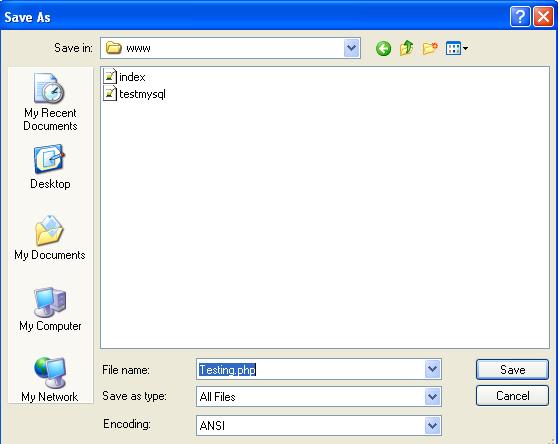
Note: while saving the file, end the name with .php and don’t forget to select all files.
Let us assume i have stored Testing.php
Step 4: Start the server
Left click on the wamp icon in system tray.
It will display list of options.
Select “start all services”.
Step 5:Run
Now all services(especially php) is running.
Open the mozilla and type localhost in address bar.
Hit enter
It will show the default page of wamp server.
Now include this Testing.php (my php file name) at the end of the url
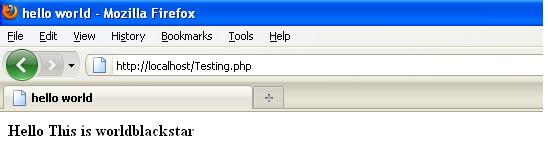
For ex:
It will run your php file.