- Joined
- Jun 13, 2020
- Messages
- 8,171
- Reaction score
- 1,200
- Points
- 212
- Awards
- 2


Do you know what programs are processing in your pc? You use Default task manager for seeing the list of Process. In Default task manage it just show only the list of process and memory usage. You may not know which one is system process,malware program,application program. Some advanced users can analyze himself what process are going on. He can end the process by right clicking on the process. But this will stop the program at the moment only. When he restart the system or after sometime,the process may continue.
To analyze the system program, detect the malware and stop the program i am going to introduce a new software “Security Windows Manager”.
How did i find this software?
Today i analyze the Task manager process. At that time i suspect on one process. so i searched in internet for definition of the program. At the end i found this wonderful security software. I like to introduce to my visitors also.
The Security Task Manager detects unknown malware and rootkits hidden from your antivirus software.
Features:
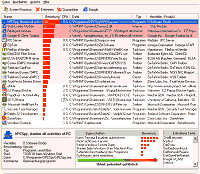
Screenshot:

To analyze the system program, detect the malware and stop the program i am going to introduce a new software “Security Windows Manager”.
How did i find this software?
Today i analyze the Task manager process. At that time i suspect on one process. so i searched in internet for definition of the program. At the end i found this wonderful security software. I like to introduce to my visitors also.
The Security Task Manager detects unknown malware and rootkits hidden from your antivirus software.
Features:
- Show the Risk process at the top.
- unique security risk rating
- free online scan with all known Antivirus engines
- full directory path and file name
- process description
- CPU usage graph
- embedded hidden functions (e.g. keyboard monitoring, browser supervision or manipulation)
- process type (e.g. visible window, systray program, DLL, IE-plugin, startup service)
- Move to quarantine the detected or suspected process
Screenshot: