















- Joined
- Jun 28, 2020
- Messages
- 6,933
- Reaction score
- 766
- Points
- 212
- Awards
- 2


This is old trick but new to Break The security. I hope that you have seen three LED lights in your keyboard, for indicating NUM lock, Scroll and Caps lock. You can use those LED lights for indicating Network activity. Using this trick, we can make the Num and Scroll lock LED for indication. These LED will start to blink whenever there is data transfer(send or receive packets on network) being processed over the Internet. So you can identify the unknown/illegal packet transfers of packets.
Trick to use Keyboard LED for Network Activity Indication:
Step 1:
Download this Simple software from here:
Network lights is simple windows software that can blinks the keyboard’s LED whenever there is packet transfer occurred(incoming and outgoing). Network lights is stand alone software(no need to install)
Step 2:
Run the program by double clicking the NetworkLights.exe file. Now you can see the traffic light icon in system tray.
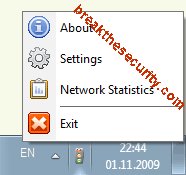
Step 3:
Click the Settings for customisation , if it is necessary.
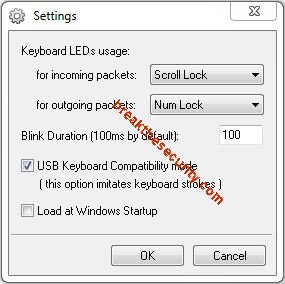
that’s all ..!!!
if there is incoming packets means, the scroll lock will blink(depending on your settings).
if there is outgoing packets menas, the Num lock will blink(depending on your settings).
Just select Exit option , if you don’t need this indication.
Trick to use Keyboard LED for Network Activity Indication:
Step 1:
Download this Simple software from here:
Network Lights:Network Lights blinks keyboard LEDs indicating outgoing and incoming network activity.
Network Lights is a Windows program, which blinks keyboard LEDs (Light Emitting Diode), indicating outgoing and incoming network packets on a network interface.
www.itsamples.com
Network lights is simple windows software that can blinks the keyboard’s LED whenever there is packet transfer occurred(incoming and outgoing). Network lights is stand alone software(no need to install)
Step 2:
Run the program by double clicking the NetworkLights.exe file. Now you can see the traffic light icon in system tray.
Step 3:
Click the Settings for customisation , if it is necessary.
that’s all ..!!!
if there is incoming packets means, the scroll lock will blink(depending on your settings).
if there is outgoing packets menas, the Num lock will blink(depending on your settings).
Just select Exit option , if you don’t need this indication.